|
|
 Open the Grid selector  1. Hit the "Add" button 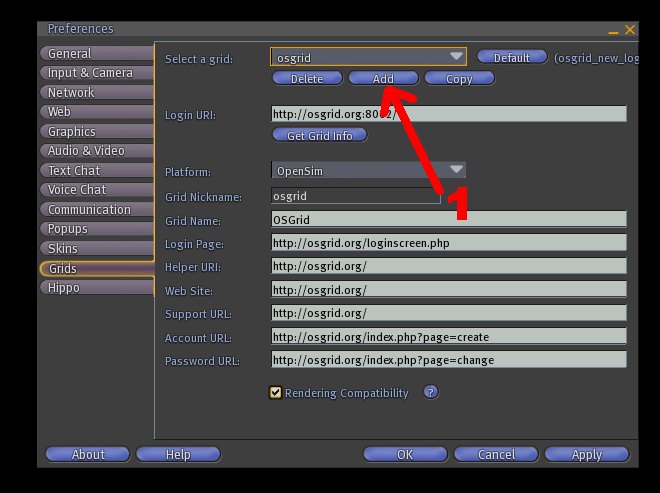 2. put in Login URI: http://login.osgrid.org/ 3. Hit the "Get Grid Info" button 4. Put a grid Login nickname. For example: "newosgrid" 5. Hit the "OK" button and your new login grid is created 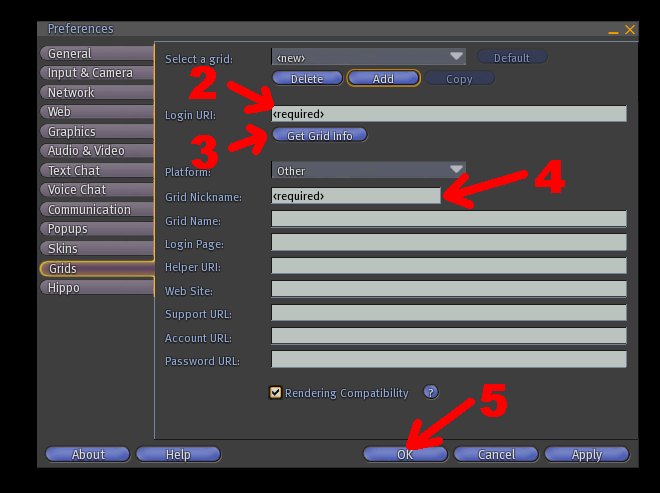 Open the grid-page which you created one more time by hitting the "Grids" button If another grid-page is showing than select the newly created from the dropdown menu. Check if your Login URI is the same as the one below here in the yellow frame. 6. Hit the "Default" button if you want OSgrid to be your standard login world. 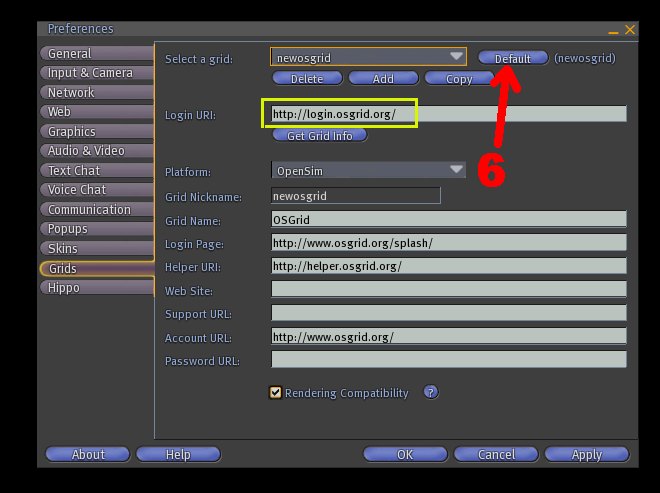 That's all :) |
As of October 19, 2010 the basic OSgrid login address that comes with the Hippo viewer is not correct anymore. If your viewer shows the old login URI of OSgrid: then you have to change it. The correct Login URI as of October 19, 2010 is: http://login.osgrid.org/ On the Hippo viewer you cannot change the existing OSgrid URI. However you can add a new grid login. How to add a new Grid Login is described here on this page in 6 steps |
| Swondo™ is a Valk Support™
initiative©Copyright Valk
Support 2010
1647 visits
About us /
Imprint |